3 LinkedIn Basics
This chapter covers setting up your profile and understanding how LinkedIn actually works. If you already have an established presence, skip ahead. If you are starting fresh or have a neglected profile from 2015, read on.
3.1 Setting Up Your Profile
Your profile is your landing page. When someone sees your post or comment, they will click through to your profile to decide whether to follow you, so it’s worth making it reflect why you’re there.
3.1.1 Your headline
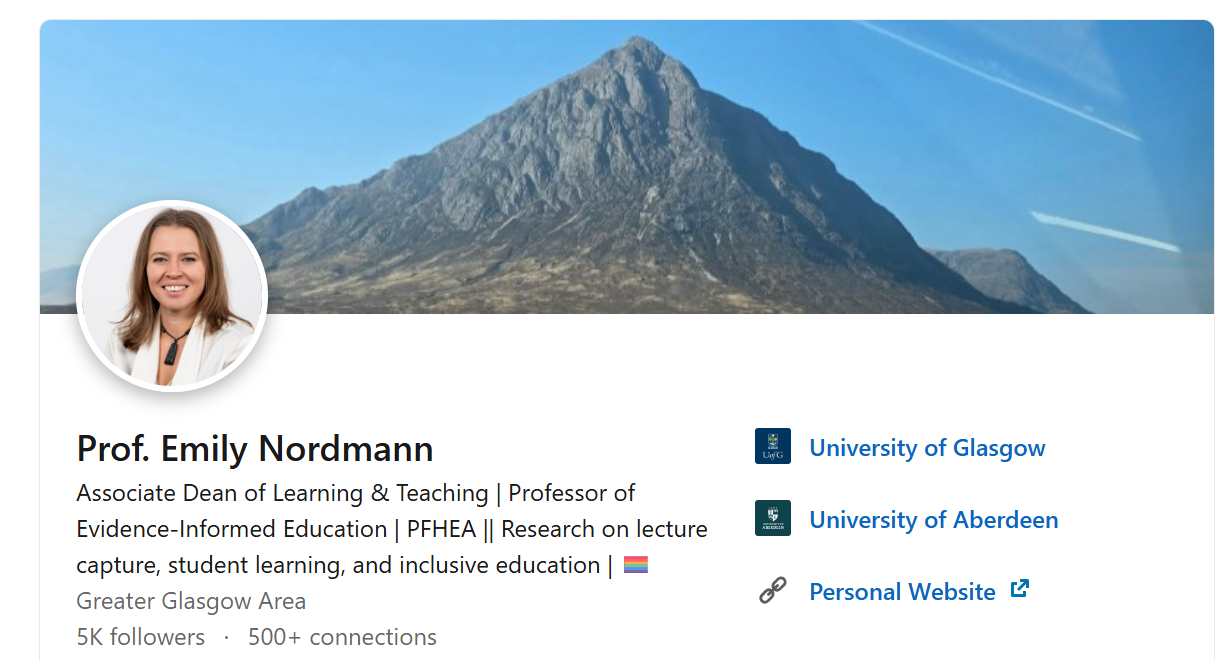
You get 220 characters. Use them to say what you actually do, not just your job title. The headline appears in search results, next to your comments, and when you appear in someone’s feed so it should tell people what you do and why they might want to follow you.
3.1.2 Your About section
This is your chance to say who you are in your own words. Write in first person. Be specific about your work and interests. Include enough personality that you sound like a human being.
Here is mine as an example:
About I am Associate Dean for Learning and Teaching and Professor of Evidence-Informed Education at the University of Glasgow. My research predominantly focuses on lecture capture, how it can be used as an effective study tool by students and the impact on students from widening participation backgrounds as well as those with disabilities and neurodivergent conditions. In all my work, I draw on theories of learning from cognitive science and self-regulation, as well as theories of belonging and self-efficacy.
My leadership roles have centred around supporting those on the learning, teaching, and scholarship track. I am currently lead of the College of MVLS LTS Network and previously founded and led the Pedagogy and Education Research Unit in the School of Psychology and Neuroscience.
I am based in the School of Psychology and Neuroscience. My teaching is varied although centres on cognitive psychology and beginner data skills in R and I am a vocal advocate of open science and open educational resources where as a member of the PsyTeachR team I have authored several open-access data skills books and tutorials.
When I am not at work I like to climb mountains, do stand-up comedy, and play videogames.
Also, super gay.
3.1.4 The rest
LinkedIn has a lot of other profile sections - as an academic I would recommend using the Experience section to list your academic positions and Education to state your degrees and which institutions you have attended. The rest (Featured posts, Skills, Awards, Publications etc.) is up to you and I think these have diminishing returns for the effort they take.
3.2 Enabling Followers
By default, LinkedIn emphasises connections (mutual relationships). But you can also enable a “Follow” option so people can see your content without you accepting a connection request.
To enable this: Settings > Visibility > Followers > Make follow primary. This means the default button on your profile becomes “Follow” rather than “Connect.” People can still connect if they click through, but following becomes the easier option.
This is useful if you want a broader audience. Connections have a limit (30,000) but followers do not. Under LinkedIn’s current algorithm, the distinction between connections and followers matters less than it used to because reach is now determined primarily by content quality signals rather than relationship type. But followers still tend to be people who actively chose to see your content, which means they are more likely to engage with it.
3.3 Understanding the Feed
3.3.1 How the algorithm works
LinkedIn uses an algorithm to determine what appears in your feed. You will not see everything from everyone you follow. The algorithm prioritises content it predicts you will engage with, based on your past behaviour, the content’s quality signals, and other factors LinkedIn will not tell you about.
Unlike Twitter, where academic researchers actually studied how the platform worked, there is very little peer-reviewed research on LinkedIn’s algorithm. Most of what we know comes from industry analyses rather than controlled studies. What follows is the best available understanding as of mid-2026, but it will change, and it is worth checking current analyses periodically.
3.3.1.1 The 360Brew system
In late 2024, LinkedIn replaced its previous collection of separate ranking models with a single unified AI system called 360Brew. Rather than evaluating content through a patchwork of disconnected signals, 360Brew assesses everything together. The overall philosophy has shifted from rewarding viral reach to what LinkedIn calls “Depth and Authority”, meaning content that demonstrates genuine expertise and generates meaningful engagement with a relevant audience.
In March 2026, LinkedIn rolled out its “Authenticity Update”, which formally penalises engagement bait, automation pods, and external link spam. The platform is now much more aggressive about detecting and suppressing low-quality engagement tactics.
The practical effect of these changes has been significant. According to Richard van der Blom’s Algorithm InSights 2025 report, organic reach has dropped substantially across the platform: views are down approximately 50%, engagement is down 25%, and follower growth has dropped by 59%. This sounds alarming, but the intent is to show content to fewer, more relevant people rather than blasting it broadly. If your content is genuinely useful to your audience, it should still find them. If you were relying on gaming the system, that no longer works.
3.3.1.2 What the algorithm favours
Saves over likes. This is the biggest shift. Under 360Brew, when someone bookmarks your post for later, that is reportedly the strongest quality signal, driving roughly 5x more reach than a like and 2x more than a comment. This is actually good news for academics because academic content (papers, resources, teaching ideas) is exactly the kind of thing people save to read properly later, even if they do not stop to leave a comment.
Dwell time. How long people spend reading your post matters. A post that someone reads for 30 seconds outperforms one that collects 50 quick likes from people who scrolled past. Content that people actually engage with, not just react to, gets favoured. Again, substantive content benefits here.
Comments still matter, but quality counts. Meaningful comments contribute significantly to reach, but the algorithm now distinguishes between substantive responses and empty engagement (“Great post!” does nothing). The old advice about the first 30-60 minutes being critical has also softened. The evaluation window is now reportedly 3-8 hours, which is more forgiving and means you do not need to be hovering over your phone the moment you post.
Original content over reposts. Reposts continue to receive substantially less distribution than original content. If you want to share someone else’s work, write your own post that engages with their content and tags them. You will reach more people and contribute something of your own.
Links to external sites reduce reach. Posts containing external links see approximately 60% less distribution than equivalent posts without links. This is a real problem for academics who want to share papers. For a while, the common workaround was putting links in the first comment rather than the post body. The evidence on whether this still helps is mixed at best, and some analyses suggest the algorithm has caught up with this tactic. My own approach is to put the link in the post itself (because hiding it in the comments is annoying for readers) and accept the reach penalty. The people who want to read your paper will find the link.
Engagement bait is penalised. The algorithm recognises patterns like “Comment YES if you agree!” and flags them as low-quality or spam. Ask genuine questions that invite real discussion rather than fishing for empty engagement.
AI-generated content performs worse. LinkedIn’s system now actively detects AI-generated content and deprioritises it. Whether this is because the algorithm penalises detected AI patterns or because AI-generated content is simply less engaging is debatable, but the effect is clear. Write your own posts.
3.3.1.3 Content formats and the algorithm
Not all post types are treated equally. Document posts (PDF carousels) are currently hitting around 6.6% engagement rates, the highest of any format. Video performs well, particularly short-form vertical video. Standard text posts struggle to break 2%. See Chapter 3 for more on how to use these formats.
That all said, do not obsess over the algorithm. It will change again, the evidence is largely based on industry analyses rather than controlled studies, and being an interesting person who posts things people genuinely want to engage with matters more than gaming the system. But it helps to understand the basics.
3.3.2 Saving posts [bookmarks]
An annoying feature of LinkedIn is that in algorithmic view, it can sometimes be hard to find a post you have previously seen, unless you remember exactly who posted it. This is particularly annoying when the page refreshes without you asking it to. You can save posts by clicking the three dots at the top of the post then “Save”.
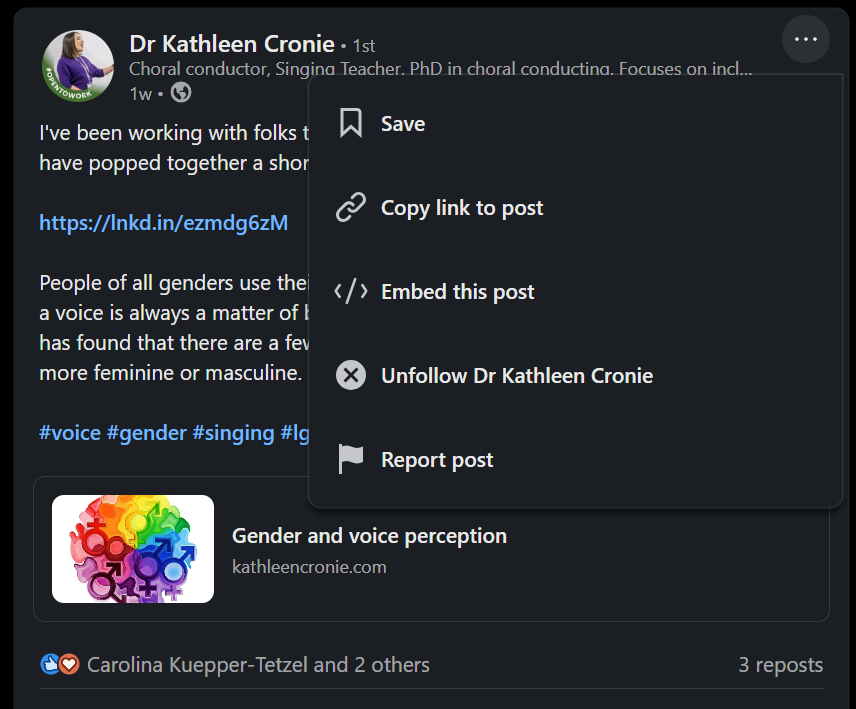
You can access your saved posts on the desktop by navigating to your home page and then in the left hand menu bar towards the bottom, click Saved items. On mobile, you just hit your profile picture and Saved posts is one of the items that comes up in the menu bar.
3.3.3 Post analytics: Saves and Sends
LinkedIn now shows you two useful metrics for your posts beyond the usual likes and comments. “Saves” tells you how many people bookmarked your post, and “Sends” tells you how often it was shared via private message. You can see these by clicking on the analytics below any of your posts.
These metrics are worth paying attention to because they often tell a different story from likes. Academic content (papers, teaching resources, detailed commentary) tends to get saved and sent more than it gets liked, because people want to come back to it or share it with a specific colleague. A post with 20 likes and 50 saves is doing better work than a post with 200 likes and 2 saves, even if it does not feel like it. As noted above, saves are also now one of the strongest signals to the algorithm, so content that gets bookmarked will be shown more widely.
3.3.4 Switching to chronological
By default, LinkedIn shows you an algorithmic feed. You can switch to chronological order if you prefer to see posts in the order they were posted.
On desktop: look for the feed sorting option near the top of your feed and select “Recent.” On mobile: tap your profile picture, then Settings > Account preferences > Preferred feed view and select “Most recent.”
Note that LinkedIn tends to reset this to algorithmic periodically, so you may need to switch it back.
3.4 Taming Notifications and Emails
LinkedIn’s default notification settings are aggressive. If you do not adjust them, you will receive emails about everything from who viewed your profile to job anniversaries to suggested posts to people you might know. It will bury anything actually useful.
Go to Settings > Notificationsand work through each section. Turn off most email notifications. Keep notifications for direct messages and comments on your posts. Turn off “news and updates,” “job opportunities” (unless you are job hunting), and most of the “network” notifications.
On mobile, go to your notification settings and adjust what generates push notifications. You probably do not need to know immediately when someone views your profile.
This is not optional. The default settings will make you hate LinkedIn. Fix them before you do anything else.
3.5 Interacting with Content
3.5.1 Reactions
LinkedIn offers several reaction options: Like, Celebrate, Support, Love, Insightful, Funny. For most purposes, just use Like. The others exist but rarely matter. Reacting acknowledges content but does not boost it much. Comments matter more for visibility.
3.5.3 Reposts
You can repost others’ content, either directly or with your own commentary added. As noted above, reposts tend to get less engagement than original posts. If you want to amplify someone’s work, consider writing your own post that engages with their content and tags them, rather than using the repost function. You will likely reach more people and contribute something of your own.
If you do repost, add your own thoughts. A bare repost without commentary is the lowest-value option.
3.5.4 Direct messages
You can message people directly. This is useful for conversations that do not need to be public.
Do not use DMs to pitch products or services. Do not send connection requests with sales messages attached. And for the love of god, DO NOT DM WOMEN TRYING TO HIT ON THEM.
3.6 Connections and Following
3.6.1 Following others
To follow someone, go to their profile and click Follow. You will see their posts in your feed. They will not see yours unless they also follow you. Following is low-commitment. Follow people whose content you find valuable, even if you do not know them personally.
3.6.2 Connection requests
Connections are mutual relationships. When you connect with someone, you both see each other’s content and can message directly.
When sending connection requests, add a note explaining who you are and why you want to connect. Generic requests without notes are often ignored, especially by people who receive many requests.
3.6.3 Who to follow
Start with people you actually know: colleagues, collaborators, people you have met at conferences. Then expand to people whose work you find interesting, people working in your area, organisations and journals relevant to your field.
LinkedIn will suggest people to follow. These suggestions are sometimes useful and sometimes bizarre. Use your judgement.
3.7 Privacy and Visibility
3.7.1 Profile visibility
You can control who sees your profile and activity through Settings > Visibility. You can adjust whether your profile is visible to people not logged in, whether your connections list is public, and whether your activity (likes, comments) is visible.
My view on this is that if you do not want your profile to be public, social media isn’t for you. The point of LinkedIn is visibility and networking. If you lock everything down, you lose most of the benefit. Either be present and visible, or do not be there at all.
3.7.2 AI training and your data
Since November 2025, LinkedIn has been using member data to train its generative AI models. This includes your profile information and public posts. It does not include private messages. Users were opted in by default, and any data collected before you opt out remains in the training set.
This matters for academics in particular. If you are posting about your research, sharing preprints, or writing detailed commentary on your field, that content is being used to train AI models unless you have explicitly turned this off. Whether you care about this is a personal decision, but you should at least know it is happening.
To opt out: Settings > Data privacy > Data for Generative AI Improvement and toggle off “Use my data for training content creation AI models.”
3.7.3 ID verification
LinkedIn now offers identity verification, and over 55 million users have verified their accounts. Verified profiles display a badge, which helps with credibility and distinguishes real accounts from fake ones. For academics, verification is straightforward and free (it uses a government ID check), and it may help if you want to establish that you are who you say you are, particularly if you work in an area where impersonation or misinformation is a concern.
3.7.4 Blocking
You can block people who are problematic. Go to their profile, click More, and select Block. When you block someone, they cannot see your profile or content, and you will not see theirs. Importantly, all comments they have made on your posts will disappear. This can be useful for removing unwanted interactions from your content.
Use blocking freely if you need to. You do not owe anyone access to your content.
3.8 A Note on LinkedIn Culture
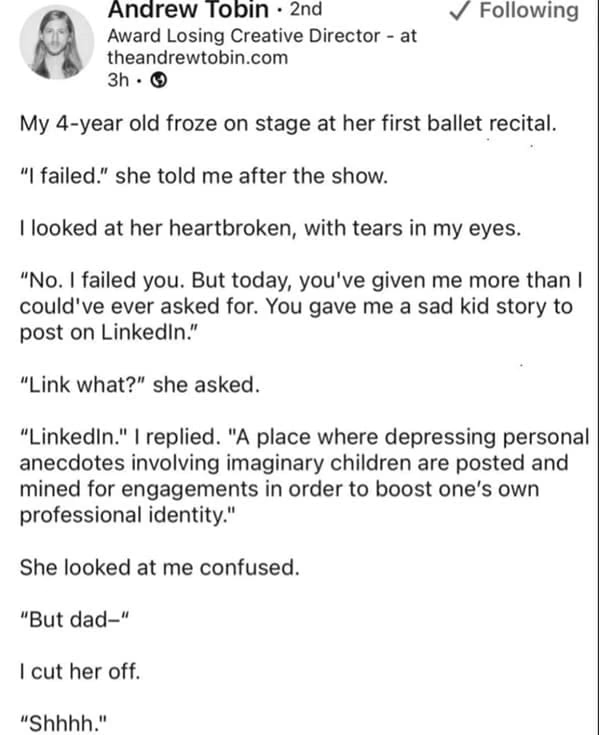
LinkedIn has a very particular culture. It skews toward professional positivity, corporate language, and motivational content. You will see a lot of posts about “exciting opportunities”, lots of “delighted to announce”, and lots of people being “humbled” by achievements.
You do not have to adopt this style and I would argue that voices that sound like actual humans stand out precisely because so much LinkedIn content sounds like it was written by a corporate communications team (or, increasingly, by AI).
Write like yourself. If you are funny, be funny. If you have strong opinions, share them. If you find the performative positivity exhausting, you are not alone but the only way LinkedIn becomes more like old Twitter is if we make it like that. Be the chaotic shitposter you wish to see.
3.5.2 Comments
LinkedIn massively favours comments for reach to the point where a comment on someone else’s post can be more valuable for building connections than your own posts. That said, if you’re going to comment, say something substantive. “Great post!” adds nothing. Engage with the actual content: ask a question, add a related point, share your own experience, respectfully disagree.